
Yuno Algo · Execution and risk automation
Rules in. Emotions out.
Your trading plan, carried out on every tick, in your own broker account.
Yuno carries your trading plan from signal to square-off without a click, in your own broker account. It sizes every order to your risk, attaches the stop, and manages exits on every tick.



- Order placed in your broker account
- Stop-loss set automatically
- Stop moved up as the price rose
- Exited at 3:15 PM, reason recorded
Yuno watches every tick, so you don't have to.Example only · not a recommendation
What we do
Two desks. One team you can call.
Automate how your rules are carried out with Yuno Algo, or open your trading and investment accounts through YUNO with a partner broker.
Automate how your rules are carried out.
Contract, live quote, risk sizing, margin check and stop-loss happen in one pass. Stops, trailing exits, partial profits and square-off are then managed on every tick.
Open your account through YUNO.
Choose one of our four partner brokers. Your account, funds and securities stay with that broker, and the YUNO team helps you open it and remains your first call.

Equity · F&O · MCX · Mutual Funds · IPO · Bonds & Debentures · PMS · SLBM · Minor Account Services
Inside the terminal
Your whole book on one screen.
Real screens from the Yuno terminal, running on sample data. Every level, every account and every order is in plain view, on desk or phone.
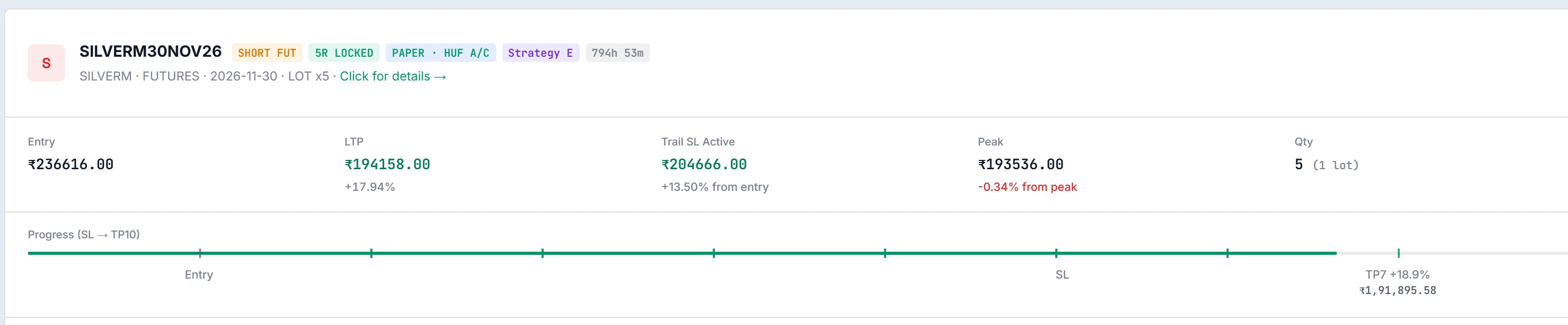
Every position, every level.
Entry, live price, trailing stop and peak sit side by side, and the path from stop to targets is drawn on one line.
- The trailing stop is shown as it moves
- Locked stops and paper positions are labelled
- Add, partial exit or exit from the same card
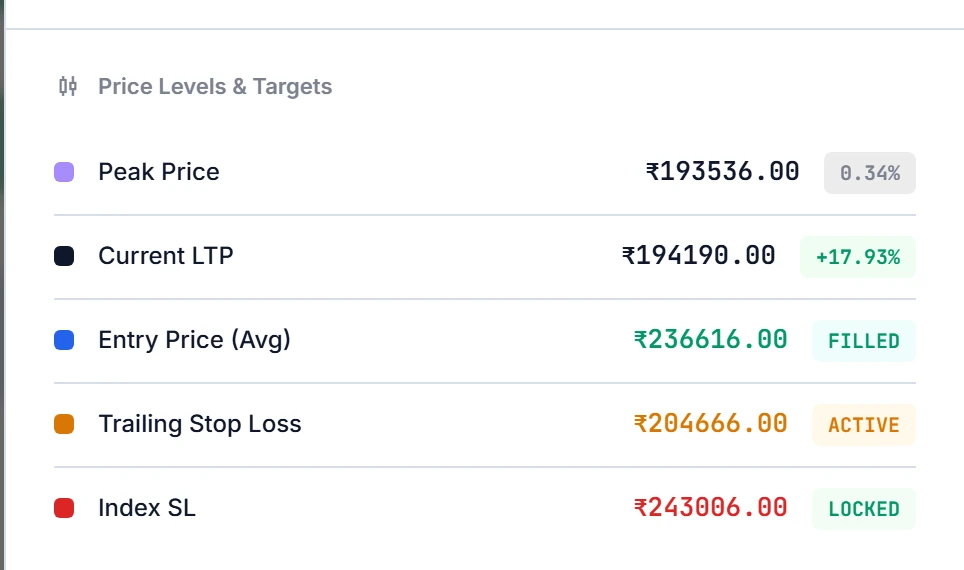
Levels you can read at a glance.
Open any trade to see its peak, live price, entry, trailing stop and index stop, each with its current status.
- Active, filled and locked states, colour-coded
- Index-based stops alongside price stops
- Position size and margin used in the same drawer
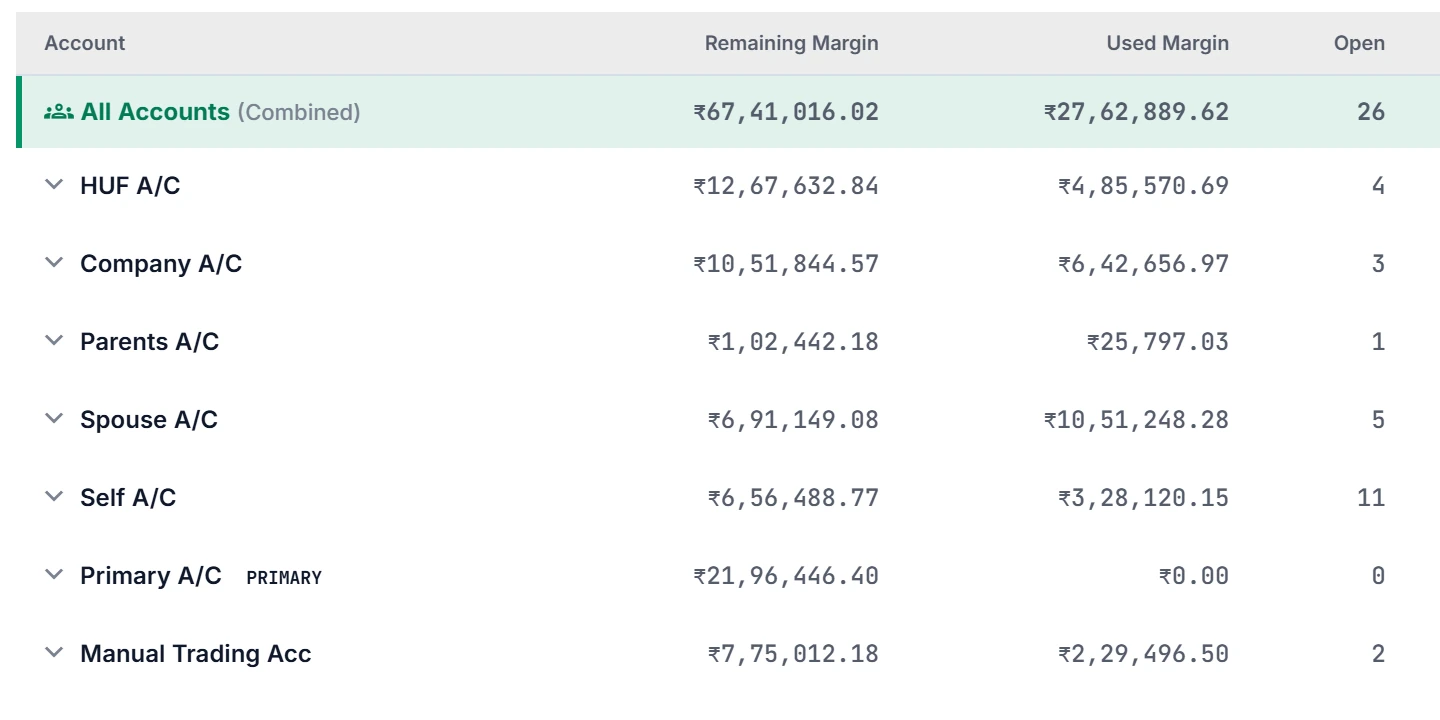
All accounts. One device.
Self, spouse, HUF, company and parents' accounts sit in one table, each with its remaining margin, used margin and open positions.
- Each account keeps its own risk settings
- Click an account to filter the whole dashboard
- Pause any account, or close every position, in one click
Every order says where it came from.
Orders placed by Yuno carry their strategy tag. Orders placed by hand, or by the broker's dealer desk, are marked too.
- Status for every order: filled, cancelled or rejected
- The broker's own reason is shown on rejections
- Records reconciled with the broker each day

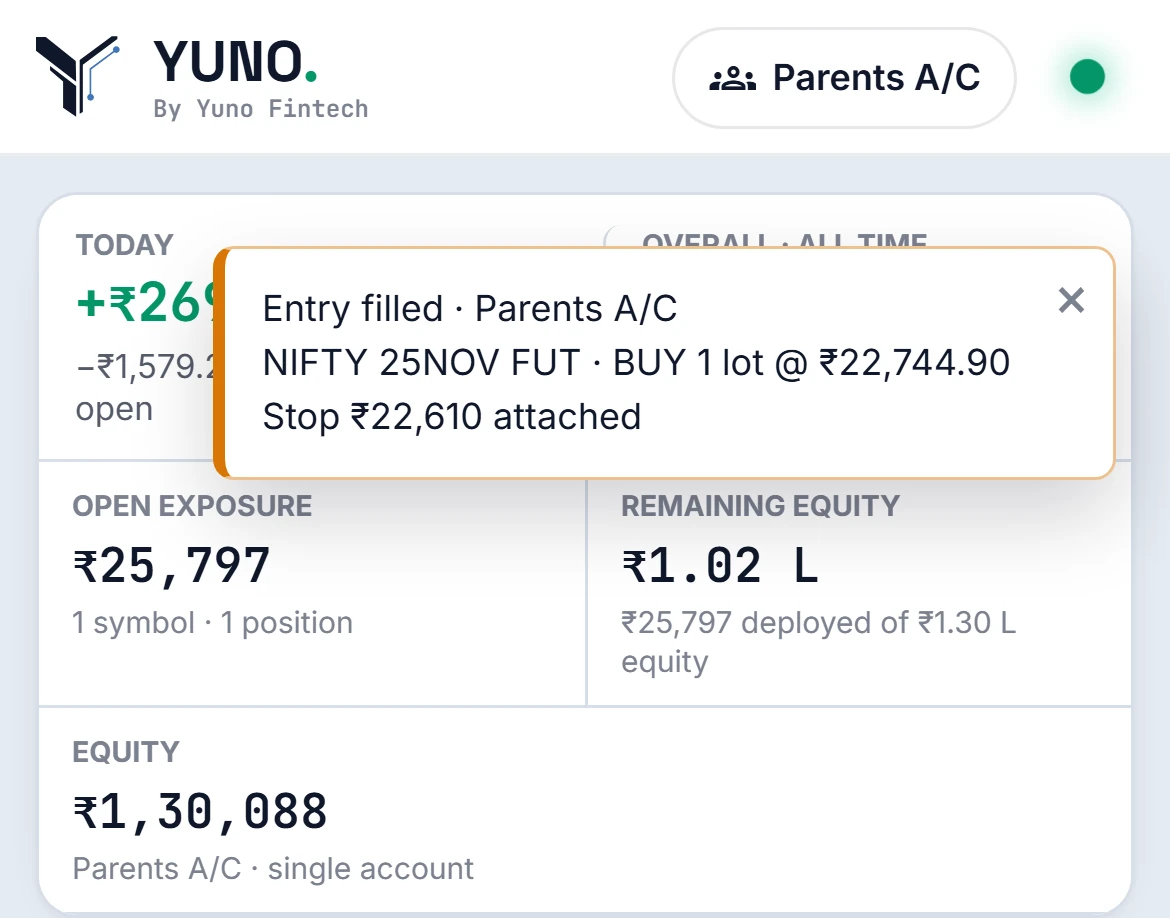
A read-only view for the family.
Share a client link for any account. Nobody shares a password and there is nothing to install. An alert arrives when an entry fills and its stop is attached.
- View only: nothing can be changed from the link
- One link per account
- Works in any phone browser
Broking services
Nine services. Four partner brokers.
From your first equity account to a minor's account or a PMS, YUNO helps you open it with the partner broker you choose.
Getting started with Yuno Algo
Live only when you are ready.
Use Yuno’s pre-built strategies or bring your own. Everything runs on paper first and goes live only after you set your limits.
- 1Demo call
We walk you through the terminal and your plan.
- 2Broker account
Use your Jainam, Bajaj or Indiabulls account, or open one.
- 3Paper trial
Your rules run on live prices with no real orders.
- 4Set your limits
Risk per trade, stops, square-off times, per account.
- 5Go live
Orders go to your own broker account.
Talk to us
Book a demo.
Tell us what you need and the message opens in WhatsApp, ready to send. A member of the YUNO team replies to you there.
